Technical Data Sheet
| Version | 1.2.4 |
| Company | FLOA |
| Author | FLOA |
| Date | 16/10/2025 |
| Platform | Magento 2.4.0 minimum and 2.4.7 maximum |
| Licence | Commercial |
Are you a FLOA customer?
You are already a FLOA customer: Go to Chapter 2
Not a FLOA customer?
To offer FLOA payment solution, first you can create a FLOA account here: www.floapay.com/contact-us-adobe-commerce.
This account will allow you to onboard yourself. You will receive an email with all login information to set-up FLOA payment method on your Magento store.
Then, download and install the FLOA module and start accepting split payments on your Magento store.
Installation of FLOA module
🚧 Requirements :
- A version of Magento 2.4.X minimum
- Curl-PHP extension installed
- JSON-PHP extension installed
- OpenSSL extension version 1.0.1 or above installed
- A version of PHP 7.1 or above (up to 8.2)
- A dedicated and not shared IP
- Your IP must have a good reputation on this website : https://www.brightcloud.com/tools/url-ip-lookup.php . If not, you can request a change using the form.
Step 1. Installation of module
Floa module is available on Adobe Marketplace : https://commercemarketplace.adobe.com/floa-payment.html
Composer installation
Install module: composer require floa/payment
Run: php bin/magento module:enable FLOA_Payment
Run: php bin/magento setup:upgrade
Run: php bin/magento setup:static-content:deploy
Flush caches with : php bin/magento cache:flush
Update with Composer
To update the extension to the latest available version (depending on your composer.json), run these commands in your terminal :
composer update floa/payment --with-dependencies --no-dev
php bin/magento setup:upgrade
php bin/magento setup:di:compile
php bin/magento setup:static-content:deploy
php bin/magento cache:flush
Activate cache
❗️ This action is mandatory for floa module version 1.2.3
To activate cache, run this command in your terminal :
php bin/magento cache:enable floaoffers
The module uses native cache from Magento.
You can enable / disable it directly from the back office "System > Cache Management" :
[block:image] { "images": [ { "image": [ "https://files.readme.io/bdf457f-image.png", null, "" ], "align": "center", "sizing": "50% " } ] } [/block]
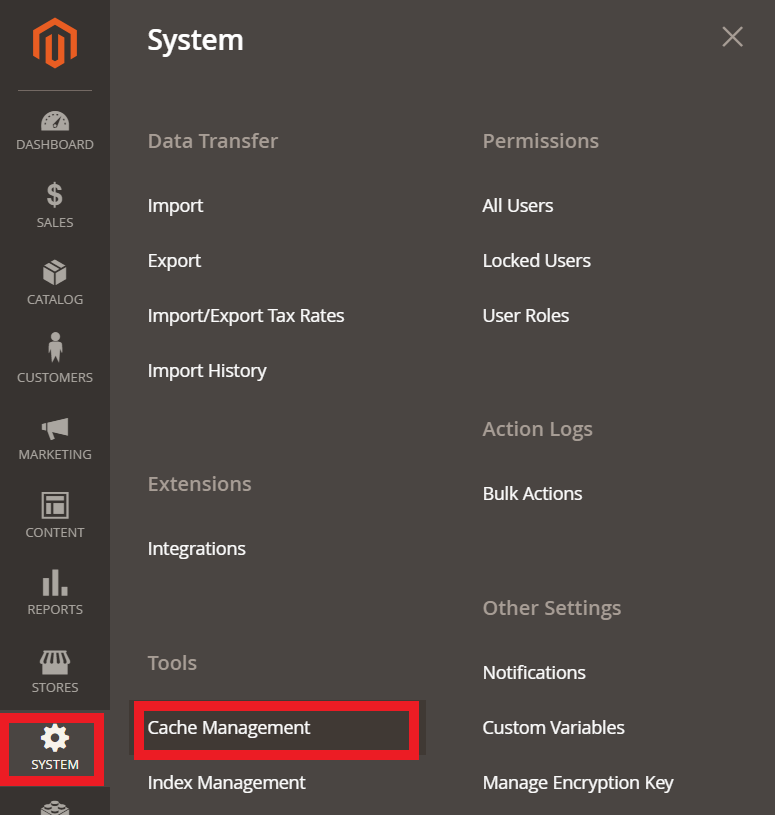
Then, control the cache status for "FloaPay offers". It can be "Enabled" or "Disabled".
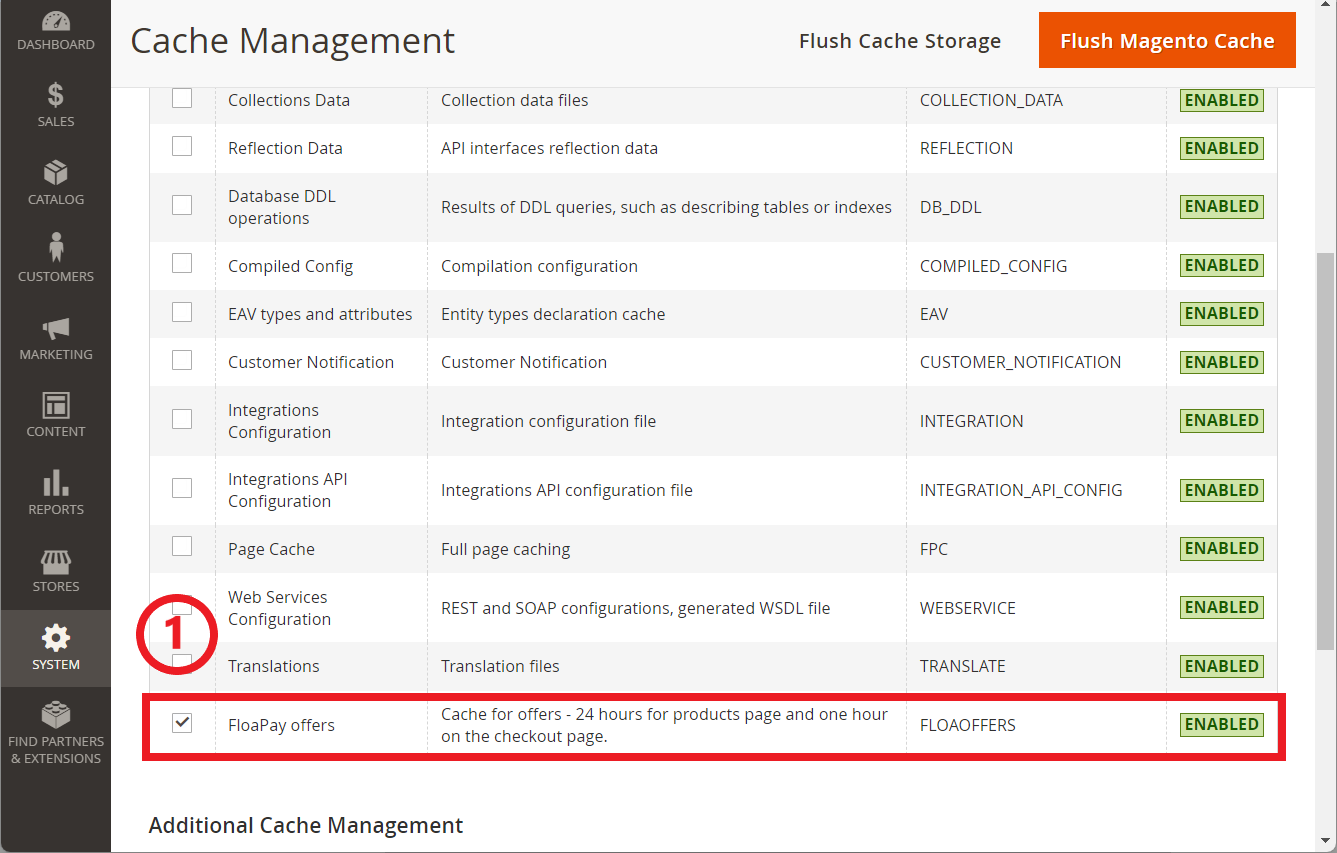
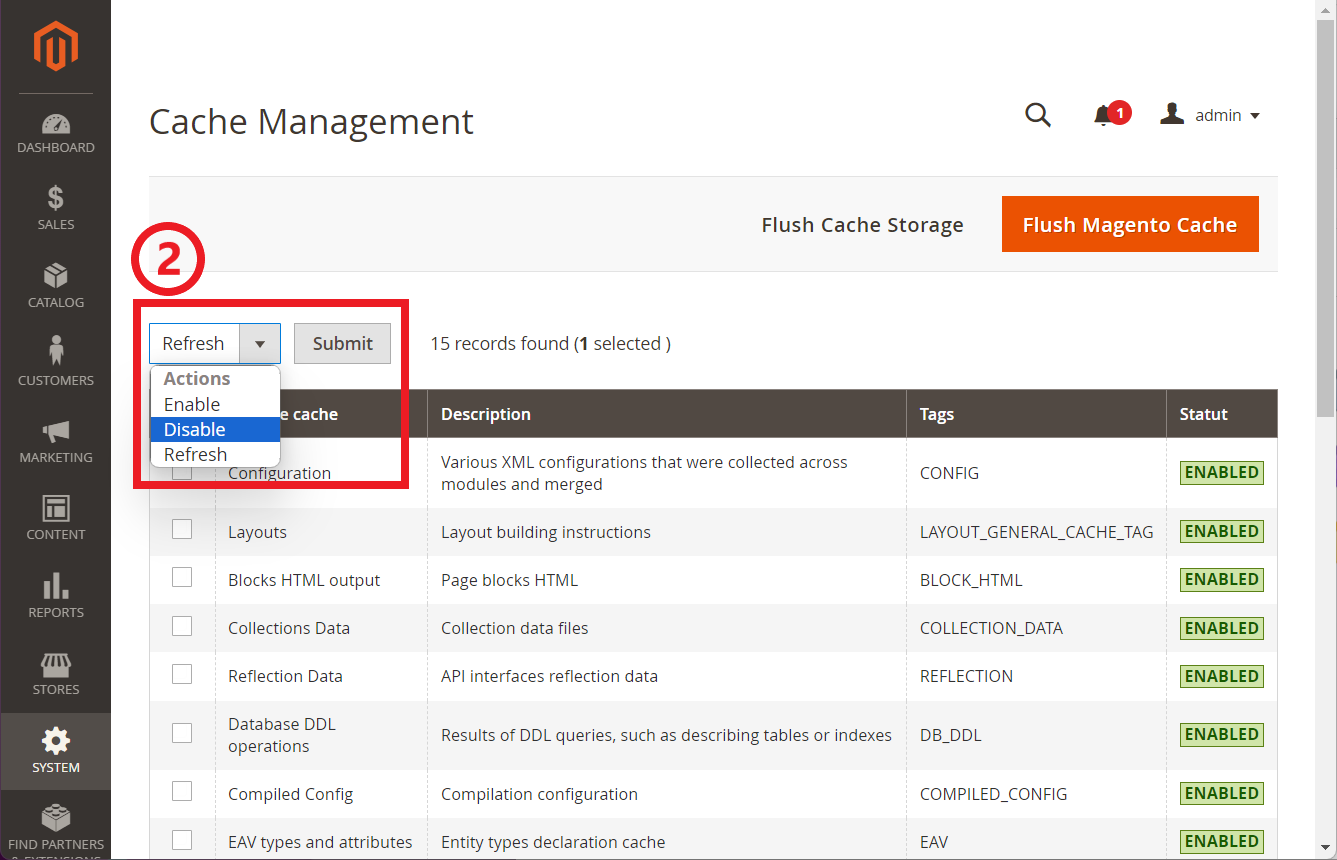
To change the status, check the box in front of the label "FloaPay offers" then choose the appropriate action in the select menu :
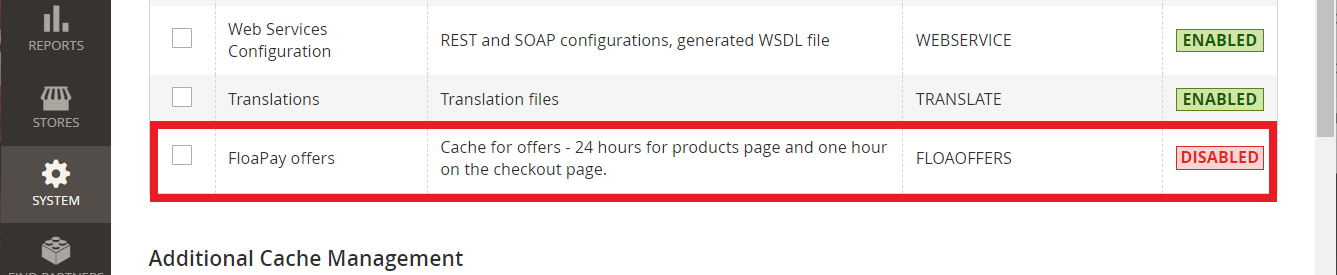
For example, after the cache is disabled, the status is "Disabled" and marked with the color red :
After changing the status for the cache, we advise you to "Flush cache storage" and "Flush Magento cache" pressing the buttons one after the other
Maintenance mode
You may want to enable the maintenance mode when installing or updating the module, especially when working on a production website. To do so, run the two commands below before and after running the other setup commands :
php bin/magento maintenance:enable
# Other setup commands
php bin/magento maintenance:disable
Module configuration
Step 2. Multisite configuration
[block:image] { "images": [ { "image": [ "https://files.readme.io/e1b7977-configuration.png", "Screenshot 2021-08-26 at 15-01-50 Configuration Settings Stores Admin Magento.png", "" ], "align": "center" } ] } [/block]
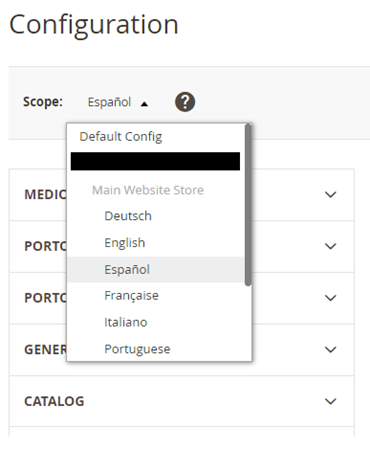
In the case of multiple countries, you need to create one scope per country.
You will have to configure the FLOA payment method for all scopes. Be careful to select the right scope before altering the configuration.
If you make a configuration on the main website, it will be reflected on all scopes.
If you have a multi-site configuration you have to activate the module on each site where you want to propose FLOA payment method:
Step 3. Merchant configuration
Once the module has been installed, here's how to configure it :
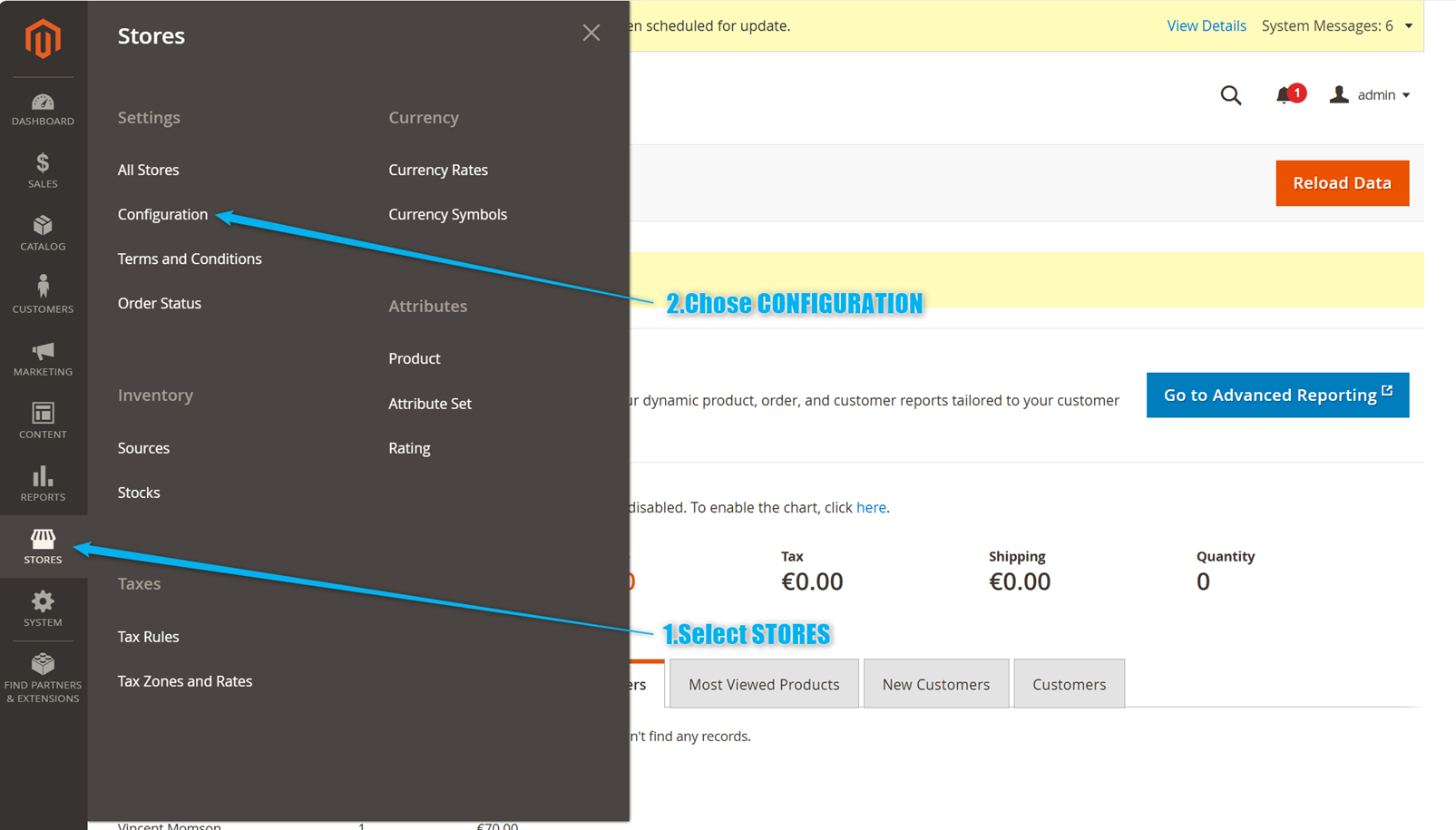
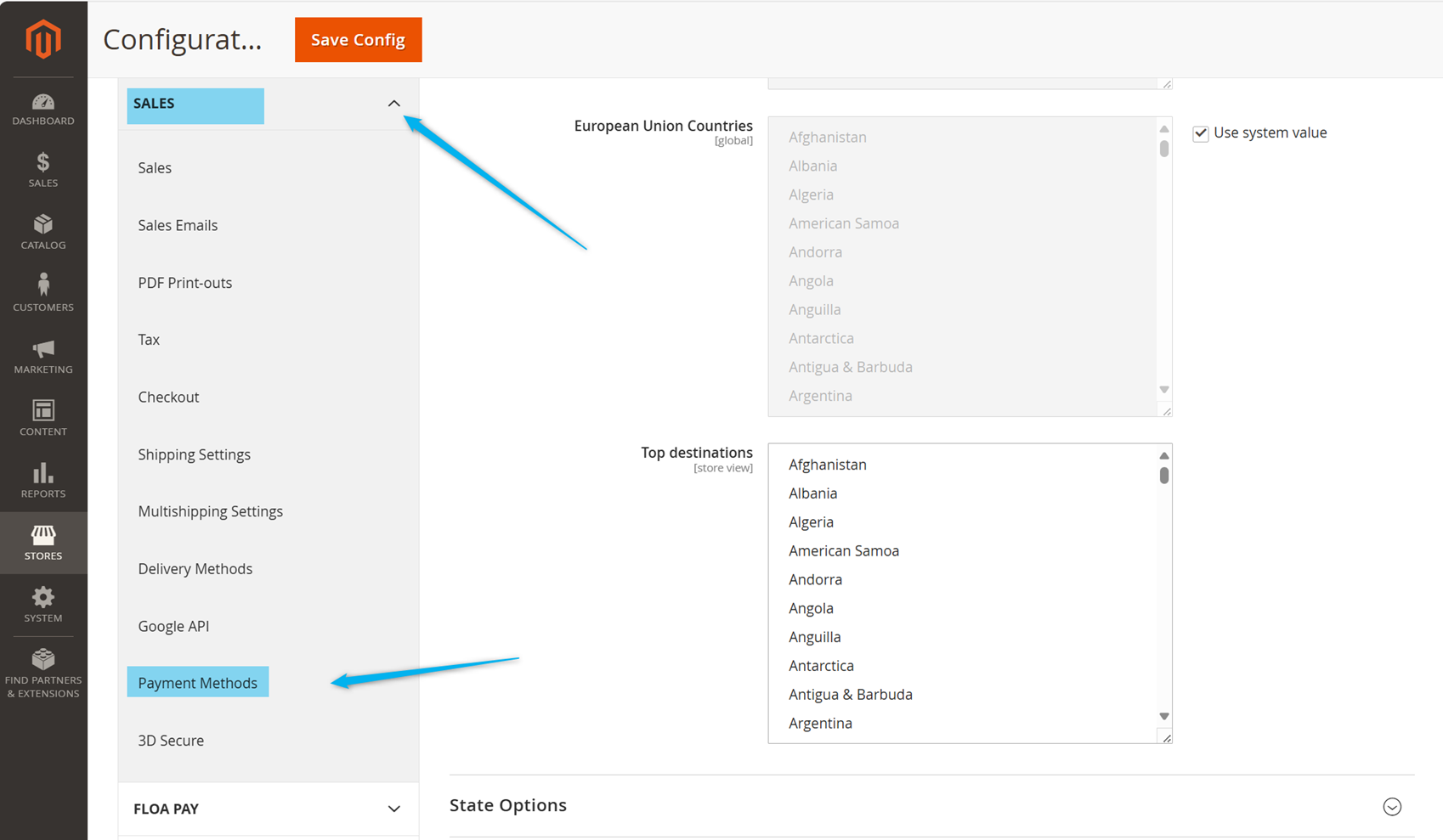
Path : Store > Configuration > Sales > Payment Methods
- SelectStores > Configuration menu
Then in the SALES tab, select Payment methods
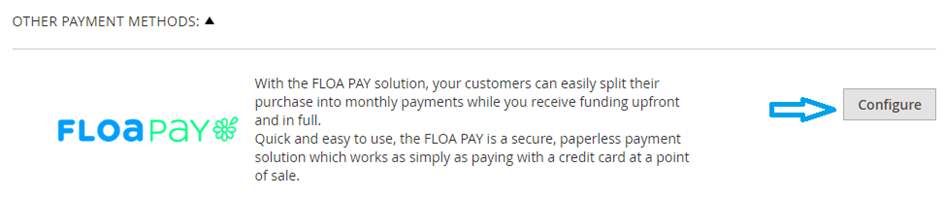
Finally, select Configure on the FLOA Pay payment method.
Merchant account configuration
To configure your merchant account, you will find the necessary identifiers to set up your settings directly in your merchant interface.
To proceed, please log in to the portal at https://merchant-cbs.floa.com/ using the login credentials that were provided to you.
Here are the details of what you will find on your settings page:
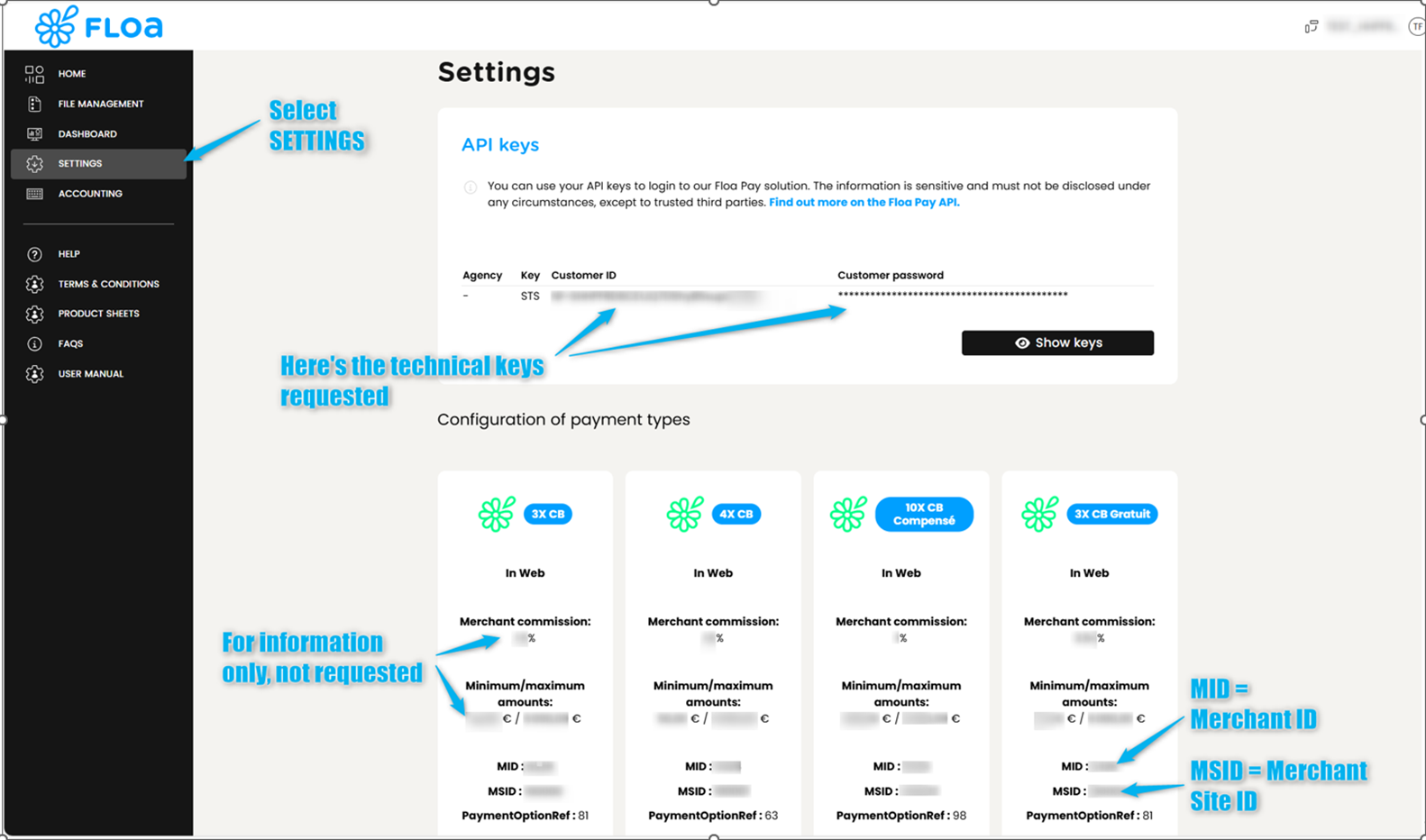
Please note : The identifiers provided here are intended exclusively for the production environment.
In your PrestaShop module, you must select the environment you wish to connect to:
- Integration: for testing purposes before going live, you can find all the necessary configuration details on the following page: https://floapay.readme.io/reference/module-testing-values
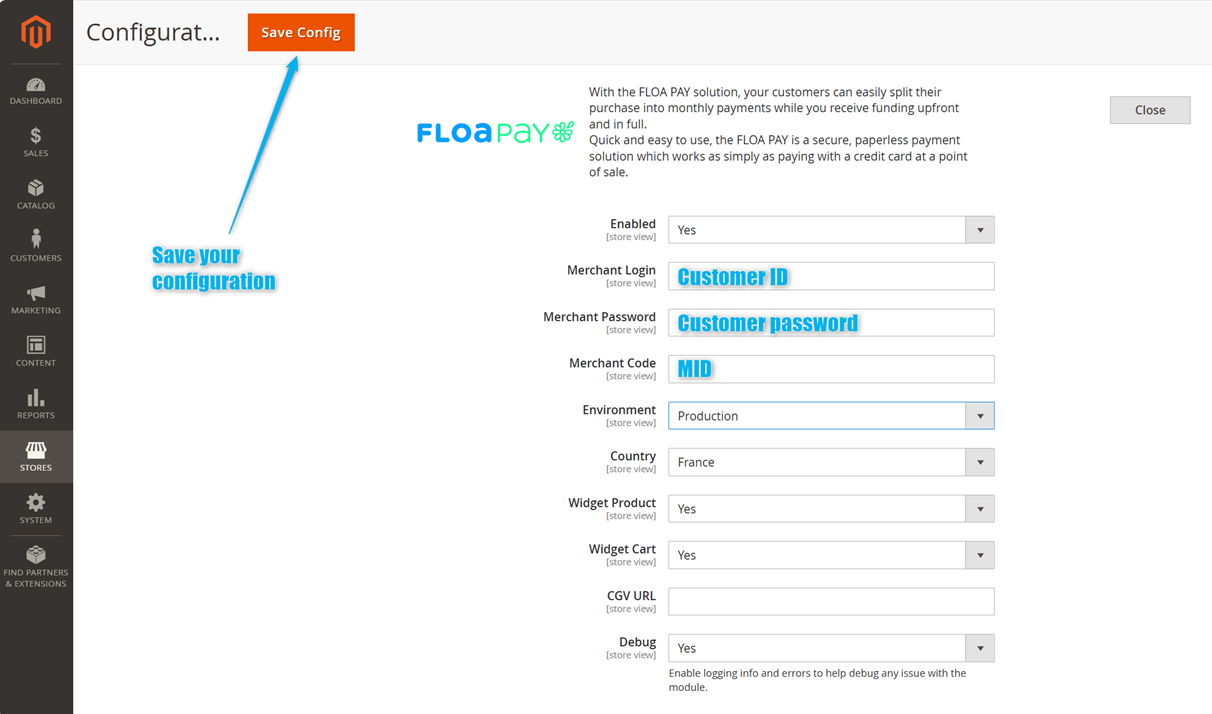
- Production: for your live FLOA environment, use the identifiers available on the Settings page of your merchant interface seen above.
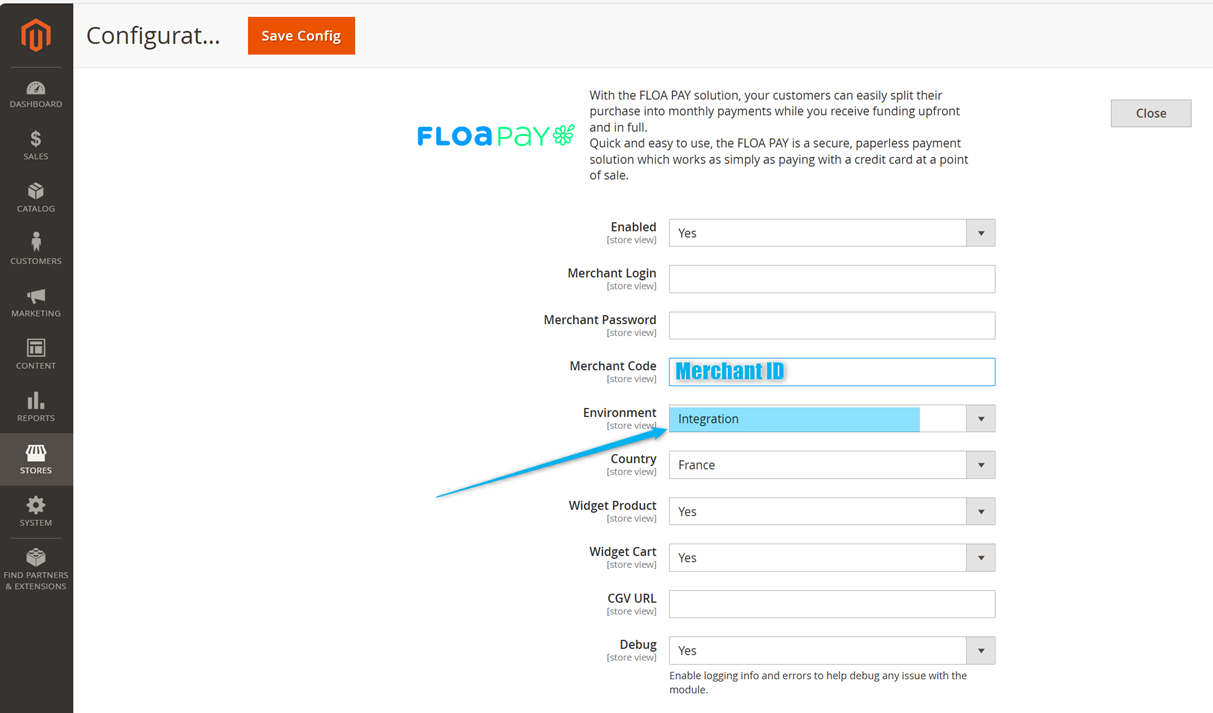
Configuration for your production environment :
- Fill in the required fields : Merchant Login, Merchant Password, Merchant ID, Environment, Country
- All the required information, including the Merchant Site ID, is available on your FLOA portal.
You can activate the FLOA highlight on your merchant site. This widget can be displayed on your product pages and/or shopping cart pages.
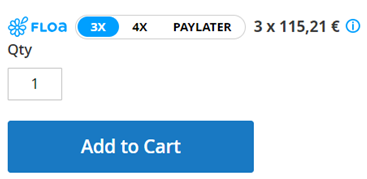
Widget product :
if you select “yes”, the Floa widget is displayed on the product page
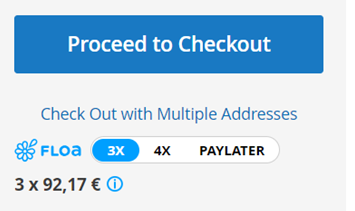
Widget Cart :
if you select “yes”, the Floa widget is displayed the cart page
CGV URL :
Insert the link to FLOA General Terms and Conditions according to your website country (it will be used on the “Consult the conditions here” sentence at the bottom of the popin)
[block:image] { "images": [ { "image": [ "https://files.readme.io/f543b4d-image.png", null, "" ], "align": "center", "sizing": "500px" } ] } [/block]

For France: this link
For Italy: this link
For Spain: this link
For Portugal: this link
For Belgium: this link
FLOA payment method
Configuration of your payment method depending on the FLOA options you have subscribed to, you can configure up to 4 payment methods:
- Deferred payment
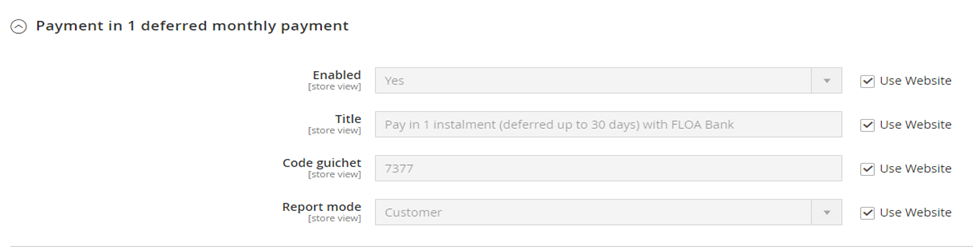
To go live, you simply need to change the Enabled setting to Yes and enter your Shop Code (also known as Merchant Site ID), then choose your deferral type.
The deferred payment has two possible configurations:
- The customer selects the deferral period (up to 30 days)
- The merchant selects the deferral period (up to 30 days)
- Payment in 3 installments
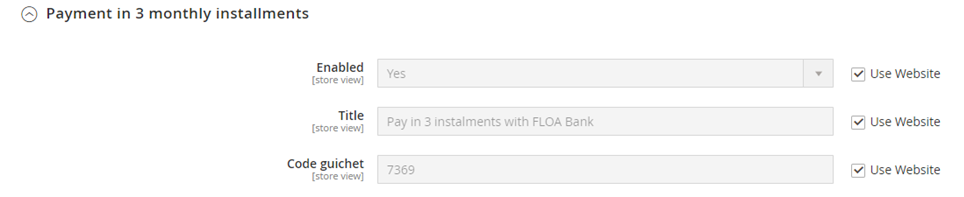
To go live, you simply need to change the Activate setting to Yes and enter your Shop Code (also called Merchant Site ID).
- Payment in 4 installments

To go live, you simply need to change the Activate setting to Yes and enter your Shop Code (also called Merchant Site ID).
- Payment in 10 installments (also called CCL)
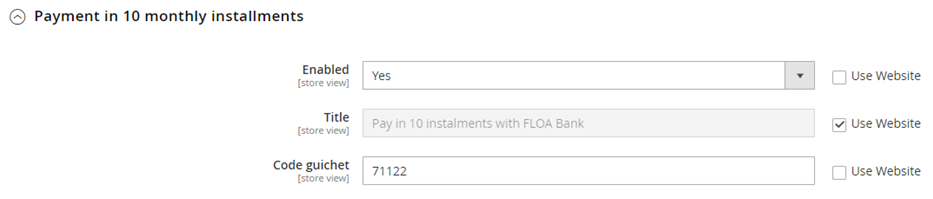
To go live, you simply need to change the Activate setting to Yes and enter your Shop Code (also called Merchant Site ID).
- “Use Website” checkbox
When you access STORES > SALES > Payment Methods, the default selected scope is “Default Config”. When you alter the settings in this scope, it can alter all your stores if you have checked the “Use Website” checkbox.
STEP 1
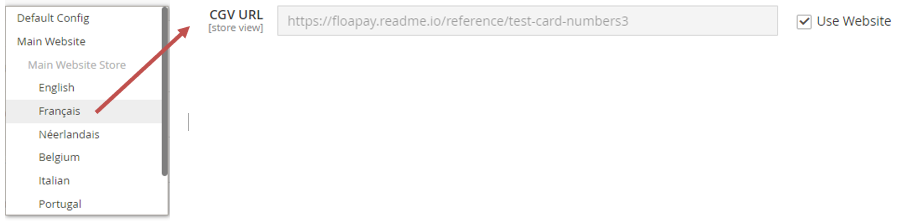
The “Use website” is checked on this store configuration for the field “CGV URL”.
STEP 2
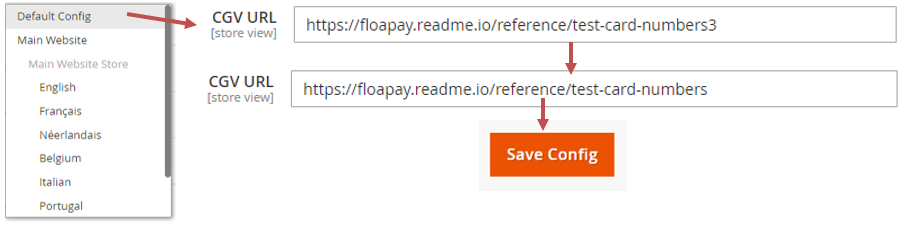
We change the value for the same field in the default config.
STEP 3
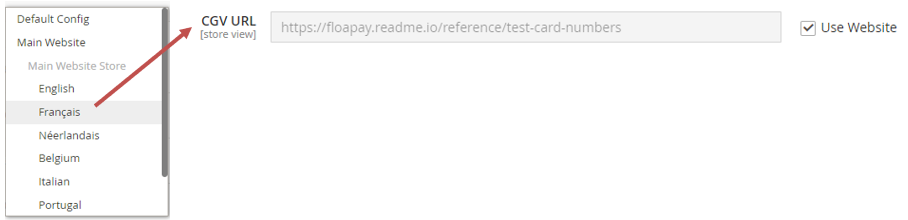
The value is altered on the Store with the same value typed in the Default Config form.
Mandatory regulations for activation
In order to be legally compliant, you must display in the "Payment" section of your GTC of sales: the FLOA legal notice with the link to the general terms and conditions for payment in instalments and the FLOA Privacy Policy. The legal notice varies from country to country, see below.
For France
[block:html] { "html": "Copy / Paste the legal notice in your GTC - don’t forget the links and <span style=\"color:#ff5189\">remove/adjust the elements in pink according to the activated solutions:" } [/block]
[block:html]
{
"html": "Paiement en [3X, 4X ou en différé sans frais] par carte bancaire avec notre partenaire FLOA.
\nNotre partenaire financier FLOA, propose des solutions de paiement pour vos achats de biens et/ou de services, <span style=\"color:#ff5189\">en différé, en 3 ou en 4 échéances par carte bancaire."
}
[/block]
Ces solutions de paiement sont réservées aux particuliers (personnes physiques majeures) résidants en France, titulaires d’une carte bancaire Visa ou MasterCard possédant une date de validité correspondant à la durée du remboursement. FLOA, RCS Bordeaux 434 130 423, dont le siège social se situe Immeuble G7 – 71 Rue Lucien Faure à Bordeaux (33300) soumise au contrôle de l’Autorité de Contrôle Prudentiel et de Résolution (ACPR) 4 Place de Budapest, CS 92459, 75436 PARIS CEDEX 09 et enregistrée à l’ORIAS sous le numéro n° 07 028 160 (www.orias.fr).
FLOA se réserve le droit d’accepter ou de refuser votre demande de financement ; vous disposez d’un délai légal de rétractation de 14 jours. Pour en savoir plus, cliquez ici. [RETURN TO FLOA GC]
Nous attirons votre attention sur le fait que si vous demandez à payer votre commande de biens et/ou de service au moyen de ces solutions de paiement, vos données personnelles seront transmises à FLOA Bank à des fins d’étude de votre demande de financement, de gestion de votre contrat de crédit et le cas échéant, de recouvrement. Pour plus d’informations, cliquez ici. [REFERENCE TO FLOA PRIVACY POLICY]
FLOA GC – France: https://www.floabank.fr/images/pdf/CB4X/Conditions-Gnrales-Vente-CB3X-CB4X.pdf
FLOA Privacy Policy - France: https://www.floabank.fr/politique-confidentialite
For Portugal
[block:html] { "html": "Copy / Paste the legal notice in your GTC - don’t forget the links and <span style=\"color:#ff5189\">remove/adjust the elements in pink according to the activated solutions:" } [/block]
[block:html] { "html": "<span style=\"color:#ff5189\">Pague em 3 ou 4 prestações sem juros ou em pagamento diferido sem custos, com cartão de crédito ou débito com o seu parceiro FLOA." } [/block]
FLOA, uma sociedade anónima (société anonyme), com o capital social de € 72.297.200, registada no registo comercial de Bordeaux com o número 434 130 423, com sede em Bâtiment G7 - 71 Rue Lucien Faure em Boreaux (33300), FRANCE. Oferece soluções de pagamento reservadas a particulares (pessoas singulares maiores de idade) residentes em Portugal e titulares de um cartão bancário Visa ou MasterCard com uma data de validade correspondente à duração do reembolso que lhe permite pagar as suas compras de bens e/ou serviços, através de ”Pagamento Diferido”, “Pagamento em 3X” ou “Pagamento em 4X”, sem juros.
Após ter concluído a sua encomenda, deverá optar por pagar utilizando o método de pagamento pretendido ”Pagamento Diferido”, “Pagamento em 3X” ou “Pagamento em 4X” por Cartão de Crédito ou Débito; será então redirecionado para a página web da FLOA, onde poderá efetuar o seu pagamento. A FLOA reserva-se o direito de aceitar ou recusar o pedido de financiamento; o cliente poderá, dentro do prazo de 14 dias, cancelar o pedido de pagamento efetuado. Para mais informações, clique aqui. [RETURN TO FLOA GC]
Note que se solicitar o pagamento da sua encomenda de bens e/ou serviços utilizando estes métodos de pagamento, os seus dados pessoais serão transmitidos à FLOA para efeitos de análise do pedido de financiamento, gestão do contrato de crédito e, se for caso disso, de recuperação. Para mais informações, clique aqui. [REFERENCE TO FLOA PRIVACY POLICY]
FLOA GC – Portugal: https://www.floapay.com/images/PDF/CGS_General_Conditions_Portugal_FLOA.pdf
FLOA Privacy Policy - Portugal: https://www.floapay.com/images/PDF/Politique_de_confidentialit_EN_pour_PORT.pdf
For Spain
[block:html] { "html": "Copy / Paste the legal notice in your GTC - don’t forget the links and <span style=\"color:#ff5189\">remove/adjust the elements in pink according to the activated solutions:" } [/block]
[block:html] { "html": "Pago en <span style=\"color:#ff5189\">3 o 4 plazos o pago diferido con tarjeta de crédito o débito con nuestro socio FLOA." } [/block]
Nuestro socio financiero, FLOA, le ofrece soluciones de pago aplazado en forma de préstamos para sus compras de bienes y/o servicios en 3 o 4 plazos con tarjeta de crédito a pagar en un máximo de 3 meses. [TAE mínima del 8,27% y máxima del 12,87%]. Con intereses. El importe mínimo a financiar es de 50€ y, el máximo, de 2.499€.
[block:html] { "html": "Pago en <span style=\"color:#ff5189\">3 o 4 plazos con gastos" } [/block]
Por ejemplo, para una compra financiada de 1.000€, las cuotas serían: 3 cuotas en 2 meses. TIN 12,04%. TAE 12,73%. Gastos mínimos a un tipo del 1% de la compra. Primera mensualidad: 336,68€ (3,34€ de tasas y 333,34€ de cuota). 2 cuotas de 336,66€. Importe total de la deuda: 1010,00€. Coste total del crédito: 10€. Sistema de amortización francés (cuotas de pago periódicas que incluyen el capital). El precio de compra sin financiar sería de 1.000€ y, financiado, de 1.010,00€.
[block:html] { "html": "Pago en <span style=\"color:#ff5189\">3 o 4 plazos sin gastos" } [/block]
Por ejemplo, para una compra financiada de 1.000€, las cuotas serían: 4 cuotas en 3 meses. TIN 0,00%. TAE 0,00%. Gastos mínimos a un tipo del 0%. Primera mensualidad: 250,00€ (0€ de tasas y 250,00€ de cuota). 3 cuotas de 250,00€. Importe total de la deuda: 1.000,00€. Coste total del crédito: 0,00€. Sistema de amortización francés (cuotas de pago periódicas que incluyen el capital). El precio de compra sin financiar sería de 1.000€ y, financiado, de 1.000,00€.
Estas soluciones de financiación no están sujetas a la Ley 16/2011, de contratos de crédito al consumo, y están reservadas a personas físicas (mayores de edad) residentes en España y titulares de una tarjeta bancaria Visa o MasterCard que no caduque antes de la última fecha de reembolso.
La financiación está sujeta a la aceptación de FLOA. Dispone de 14 días naturales para ejercer su derecho de desistimiento.
Para más información, pulse aquí para ver los Términos y Condiciones aplicables al pago en varios plazos de FLOA. [RETURN TO FLOA GC]
FLOA es una sociedad anónima constituida en Francia, inscrita en el Registro Mercantil de Bordeaux 434 130 423 y con sede social en: Immeuble G7, 71 Rue Lucien Faure 33300 BORDEAUX. FLOA está sometida al control de la “Autorité de contrôle prudentiel et de résolution” (ACPR) 4 Place de Budapest, CS 92459, 75436 PARIS, número del Registro ORIAS 07028160 (www.orias.fr).
Recuerde que, si solicita el pago de su pedido de bienes y/o servicios utilizando una de estas soluciones de pago, sus datos personales se transmitirán a FLOA con el fin de revisar su solicitud de financiación, gestionar su contrato de crédito y, en su caso, el cobro. Para más información, haga clic aquí. [REFERENCE TO FLOA PRIVACY POLICY]
FLOA GC – Spain: https://www.floapay.com/images/PDF/20210118_CGV_Espagne_vdef.pdf
FLOA Privacy Policy - Spain: https://www.floapay.com/images/PDF/20210614_POLITIQUE_CONFIDENTIALITE_FLOA_BANK_vES.pdf
For Italy
[block:html] { "html": "Copy / Paste the legal notice in your GTC - don’t forget the links and <span style=\"color:#ff5189\">remove/adjust the elements in pink according to the activated solutions:" } [/block]
[block:html] { "html": "Paga in 3x, 4x o con pagamento dilazionato <span style=\"color:#ff5189\">senza interessi tramite carta di credito con il nostro partner FLOA Bank." } [/block]
[block:html] { "html": "Il nostro partner finanziario FLOA (come di seguito definito) propone soluzioni di pagamento per i tuoi acquisti di beni e/o servizi, con pagamento differito, <span style=\"color:#ff5189\">in 3 o 4 rate con carta di credito, senza interessi." } [/block]
Queste soluzioni di pagamento sono riservate agli individui (persone fisiche aventi maggiore età) residenti nel territorio dell’Italia e in possesso di una carta di credito del circuito Visa o MasterCard che non scada prima della data del pagamento dell’ultima rata.
FLOA, société anonyme, capitale sociale di 72.297.200 Euro, n. di iscrizione 434 130 423 nel Registro delle Imprese (RCS) di Bordeaux, sede legale in Immeuble G7 - 71 Rue Lucien Faure 33300 Bordeaux, FRANCE inclusa nel registro tenuto da ORIAS al numero 07028160. Sottoposta al controllo dell'Autorité de Contrôle Prudentiel et de Résolution (ACPR) 4 Place de Budapest, CS 92459, 75436 PARIS, FRANCE (‘’FLOA’’).
Aderendo alla soluzione di pagamento dilazionato di FLOA, instaurerai un rapporto contrattuale autonomo tra te e FLOA, regolato dalle CONDIZIONI GENERALI DEL “PAGAMENTO DIFFERITO”, “PAGAMENTO IN 3X”, “PAGAMENTO IN 4X” di FLOA disponibili qui (‘’Condizioni Generali di FLOA’’). Ti invitiamo a leggere attentamente tali Condizioni Generali di FLOA. [RETURN TO FLOA GC]
Ti preghiamo di considerare che se richiedi il pagamento dei tuoi ordini di beni e/o servizi per mezzo di una di queste soluzioni di pagamento, i tuoi dati personali saranno trasmessi a FLOA al fine di esaminare la tua richiesta di finanziamento, gestire il tuo contratto di finanziamento e, dove opportuno, il recupero del credito. Per maggiori informazioni leggi la Privacy Policy di FLOA disponibile qui. [REFERENCE TO FLOA PRIVACY POLICY]
FLOA GC – Italy: https://www.floapay.com/images/PDF/GTC_FLOAPAY_Italy_bilingue.pdf
FLOA Privacy Policy - Italy: https://www.floapay.com/images/PDF/Privacy_Policy_IT.pdf
For Belgium – French
[block:html] { "html": "Copy / Paste the legal notice in your GTC - don’t forget the links and <span style=\"color:#ff5189\">remove/adjust the elements in pink according to the activated solutions:" } [/block]
[block:html] { "html": "Paiement en <span style=\"color:#ff5189\">3X ou en <span style=\"color:#ff5189\">1X différée sans frais par carte bancaire avec notre partenaire FLOA." } [/block]
Notre partenaire financier FLOA propose des solutions de paiement pour vos achats de biens et/ou de services, en différé, ou en 3 échéances [dans un délai de deux mois] par carte bancaire et ce, sans aucun frais. Ces solutions de paiement sont réservées aux particuliers (personnes physiques majeures) résidant sur le territoire de la Belgique, titulaires d’une carte bancaire Visa ou MasterCard n’expirant pas avant la date de la dernière échéance de remboursement. FLOA, SA au capital de 72.297.200 € - RCS Bordeaux 434 130 423, dont le siège social se situe Immeuble G7 – 71 Rue Lucien Faure 33300 Bordeaux, FRANCE. Soumise au contrôle de l’Autorité de Contrôle Prudentiel et de Résolution (ACPR) 4 Place de Budapest, CS 92459, 75436 PARIS, FRANCE.ORIAS n° 07028160 (www.orias.fr).
FLOA se réserve le droit d’accepter ou de refuser votre demande de financement ; vous disposez d’un délai légal de rétractation de 14 jours. Pour en savoir plus, cliquez ici. [RETURN TO FLOA GC]
Nous attirons votre attention sur le fait que si vous demandez à payer votre commande de biens et/ou de service au moyen de l’une de ces solutions de paiement, vos données personnelles seront transmises à FLOA à des fins d’étude de votre demande de financement, de gestion de votre contrat de crédit et le cas échéant, de recouvrement. Pour plus d’informations, cliquez ici. [REFERENCE TO FLOA PRIVACY POLICY]
FLOA GC – Belgium: https://www.floabank.fr/images/pdf/CB4X/CGV_BELGIQUE/CGV_BELG_EN_FR_NL.pdf
FLOA Privacy Policy - Belgium: https://www.floapay.com/images/PDF/Politique_de_confidentialit_BELG.pdf
For Belgium – Dutch
[block:html] { "html": "Copy / Paste the legal notice in your GTC - don’t forget the links and <span style=\"color:#ff5189\">remove/adjust the elements in pink according to the activated solutions:" } [/block]
[block:html]
{
"html": "Betalen in 3 of 1 termijn(en) of uitgestelde betaling kosteloos per bankkaart met onze partner FLOA.
\nOnze financiële partner FLOA biedt betalingsoplossingen voor uw aankopen van goederen en/of diensten, <span style=\"color:#ff5189\">via uitgestelde betaling of in 3 termijnen[binnen een periode van twee maanden]<span style=\"color:#ff5189\"> met een kredietkaart, en dit, zonder kosten."
}
[/block]
Deze betaaloplossingen zijn voorbehouden aan particulieren (meerderjarige natuurlijke personen) die in België wonen en in het bezit zijn van een Visa of MasterCard bankkaart die niet vervalt voor de laatste aflossingsdatum.
FLOA, naamloze vennootschap met een kapitaal van €72,297,200, ingeschreven in het handels- en vennootschapsregister (“RCS”) van Bordeaux, Frankrijk, onder het nummer 434 130 423, en waarvan de maatschappelijke zetel gevestigd is te Immeuble G7 – 71 Rue Lucien Faure, 33300 Bordeaux, Frankrijk, en onderworpen aan het toezicht van de Autorité de Contrôle Prudentiel et de Résolution (ACPR), 4 Place de Budapest, CS 92459, 75436 PARIS CEDEX 09, Frankrijk, en ingeschreven bij het ORIAS onder het nummer 07 028 160 (www.orias.fr).
FLOA behoudt zich het recht voor om uw financieringsaanvraag te accepteren of af te wijzen; u heeft 14 kalenderdagen de tijd om uw aanvraag te herroepen. Voor meer informatie, klik hier. [RETURN TO FLOA GC]
Wij maken u erop attent dat indien u via deze betaaloplossingen verzoekt om betaling van uw bestelling van goederen en/of diensten, uw persoonsgegevens aan FLOA worden doorgegeven ten behoeve van de verwerking van uw financieringsaanvraag, het beheer van uw kredietovereenkomst en, indien van toepassing, voor de invordering. Voor meer informatie, klik hier. [REFERENCE TO FLOA PRIVACY POLICY]
FLOA GC – Belgium: https://www.floabank.fr/images/pdf/CB4X/CGV_BELGIQUE/CGV_BELG_EN_FR_NL.pdf
FLOA Privacy Policy - Belgium: https://www.floapay.com/images/PDF/Politique_de_confidentialit_BELG.pdf
Use of the module
Order management
When an order is placed with the FLOA module, you will find information concerning the payment, the customer's payment schedule, and actions that can be carried out on it in the details of your Magento order.
Capturing payments
In the case your account is set on manual capture, you will be able to validate the order manually and it will charge the customer once you’ve done the action. This normally happens when you have checked the availability of the product or when the order is ready for delivery.
However, you must respect a maximum delay of 6 days, otherwise, the pre-authorization from the customer's bank at the time of payment will have expired, in which case the payment is no longer guaranteed.
To do this, simply click on Capture Order in the FLOA section of the order details.
A confirmation message will be displayed to inform you that the capture was successfully processed.
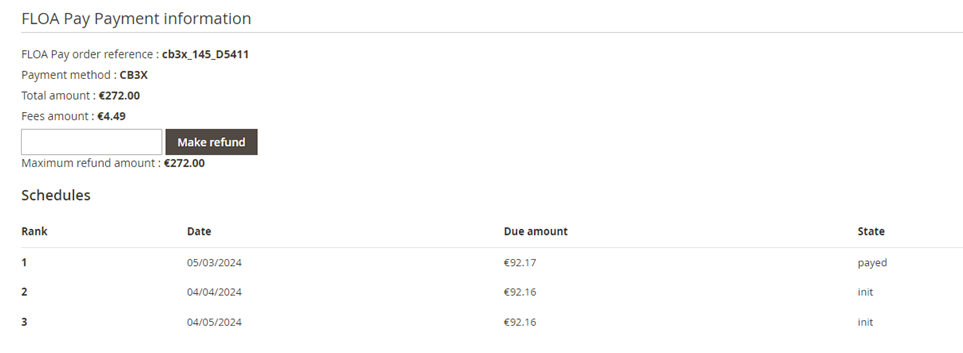
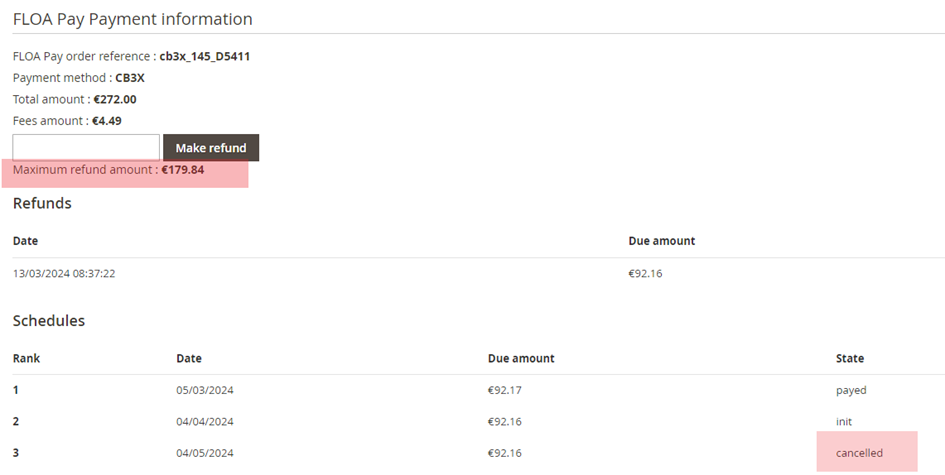
Refund
You can make refunds of your FLOA order directly from your Magento 2 BackOffice.
Simply enter the amount to be refunded and click on the button Make refund.
A confirmation message will be displayed to inform you that the refund was successfully processed.

CUSTOMER JOURNEY
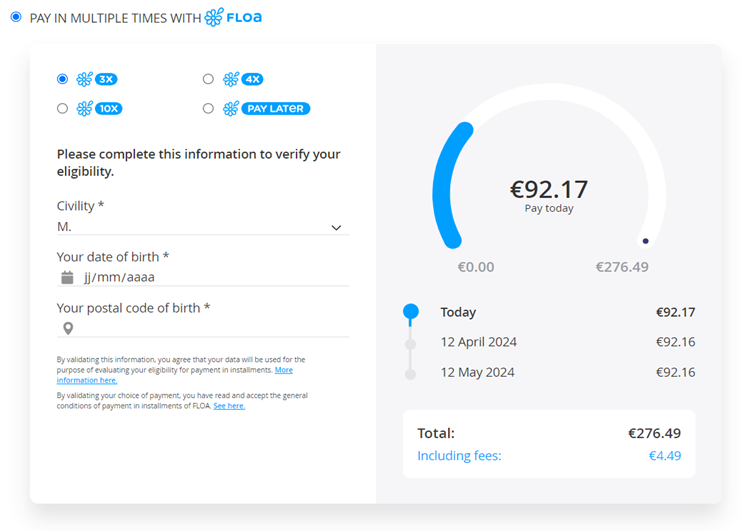
Once your FLOA payment solution are configured and activated, payment method will appear on your shop as follows:
By selecting the available FLOA payment methods, the customer will be asked to fill-in additional information to be eligible for FLOA split payments!
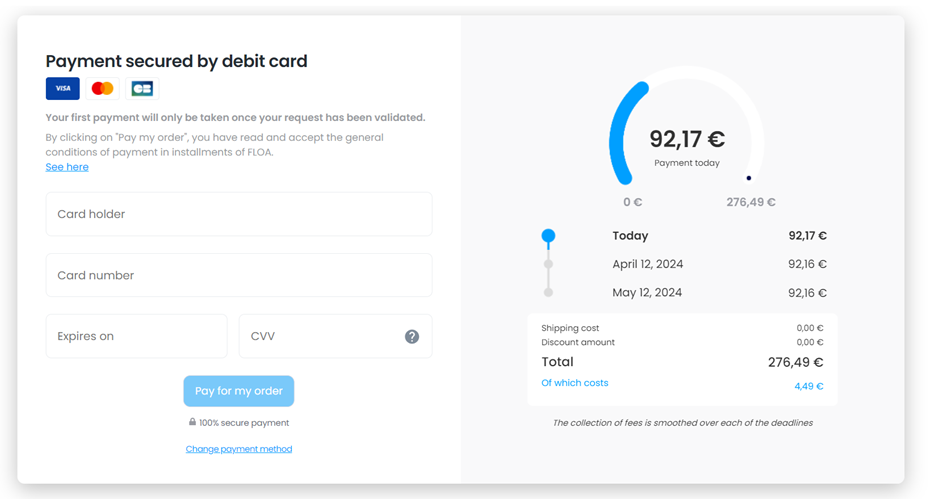
Once the information has been approved, the customer is redirected to the payment page to fill-in their bank details:
Lastly, the customer is redirected to the merchant site with an order confirmation message : Post-payment customer journey
Silent notification
If the customer closes the payment page immediately after the banking information has been approved, a silent notification is sent to the merchant site to allow the creation of the order related to this transaction.
This is sent every 5 minutes, up to 5 times or until the merchant acknowledges it.
The URL called silently is like : https://merchant-website-url.fr/floa/payment/ipn/ (where merchant-website-url.fr is your domain name).
Each shop will have this route in return for IPN (notification).
The diagram is as follows:
- The customer makes his payment, but he is not redirected as he should be (example: the browser is closed or he lost his internet connection)
- The Floa APIs contact the store IPN (notification) to provide information of the completed payment
- The order is created on the shop and a confirmation email is sent
- The store must therefore be able to be contacted by the Floa APIs on this route in a “POST” type request